
Some Shasta synthesizer users have experienced a sudden and significant slowdown during synthesis — sometimes stretching run times from hours to days.
This issue can lead to failed runs and wasted plates if not addressed quickly.
The most common cause is a Y‑axis cable connection issue affecting the movement of the XY Table. This can cause the Shasta synthesizer to pause, slow dramatically, or freeze mid-run.
How It Happens
-
The Shasta’s Top (Y‑axis) movement can stretch or shift the cable that connects to the motor head assembly.
-
If the cable is strained or the connector becomes partially loose, the instrument may pause or slow as it tries to complete movements.
-
In some cases, this happens at the extreme travel points (furthest left or right positions).
-
Even if there’s enough cable slack, certain movement patterns can still shift the connection enough to cause intermittent contact.
Symptoms
You may notice:
-
Significantly slower injection times as the run progresses.
-
Example: ACN steps that normally takes ~18 seconds may take 6+ minutes later in the run.
-
The instrument may freeze over the weekend or after long runs until restarted.
-
Y‑axis movements feel delayed, hesitant, or inconsistent.
-
Chamber pressure calibration may be off after a freeze.
Troubleshooting Steps
-
Review Logs
-
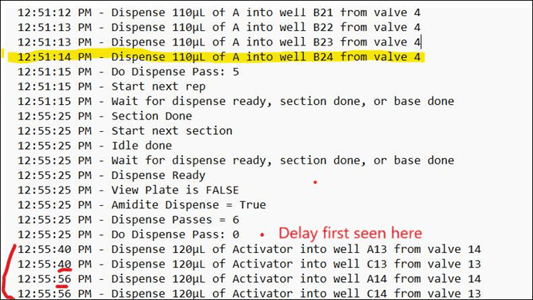
Open the run log and compare injection times from early cycles to those in later cycles, looking for a progressive increase in duration.
-
Look for large increases in wash or reagent injection durations.
-
-
Inspect the Y‑Axis Cable & Connector
-
Power down the instrument.
-
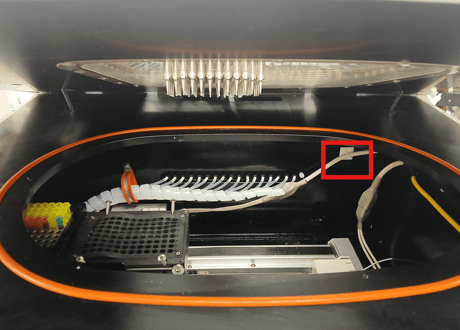
Locate the Y‑axis cable running to the top injection head.
-
With the instrument powered off, gently flex and tug the cable along its full length while observing the connector — any shift, wobble, or partial ejection at the connector indicates a loose or failing connection.
-
Ensure the connector is seated fully and securely.
-
Check for frayed, pinched, or stretched cable areas.
-
-
Check for Obstructions
-
Verify nothing is physically impeding the movement of the head along the Y‑axis.
-
Ensure cables are routed so they don’t snag during travel.
-
-
Restart the Instrument
-
If frozen, restart both the PC and the instrument.
-
Perform a chamber pressure calibration to confirm stability.
-
-
Document Findings
-
Take photos of the Y‑axis cable and connection.
-
Send images and any observations to support@sierrabio.com for review.
-
Preventive Tips
-
Periodically inspect all motion‑axis cables for wear and secure connections.
-
Keep cable slack optimized to avoid excess strain at extreme travel points.
-
If the slowdown persists after inspection and reseating the connector, contact Sierra BioSystems Support at support@sierrabio.com to arrange Y-axis cable replacement.
Need Help?
If you continue to see synthesis slowdowns or freezes, please send:
-
A brief description of the issue
-
Photos of the Y‑axis cable and connector
-
Relevant log files
Contact Sierra BioSystems Support at support@sierrabio.com