
Pressure Imbalance on K&A Synthesizers:
Applies to: K&A H-series oligonucleotide synthesizers
Does not apply to: Shasta synthesizers. Shasta uses a different fluidic and pneumatic architecture. If you run both platforms, this article is K&A only.
Category: Troubleshooting – Fluidics / Delivery Consistency Audience: K&A synthesizer end users and lab staff
Summary
Your K&A synthesizer uses two independent pressure systems, and they need to stay in the correct relationship to each other for consistent synthesis results. If the balance between high pressure (compressor or in-house compressed air, used to seal the valves) and low pressure (argon, used to push reagents from the bottles to the columns) drifts outside the recommended ranges, you'll see inconsistent delivery between columns, inconsistent volumes between different reagents, or both. This article explains why, what the correct settings are, and how to check your system before contacting support.
Recommended Pressure Setpoints
| Pressure System | Source | Function | Setpoint | Acceptable Range |
|---|---|---|---|---|
| High Pressure | Compressor (or in-house compressed air/N₂) | Seals membrane valves, drives pneumatic actuation | 0.30 – 0.35 MPa (44 – 51 PSI) | 0.28 – 0.40 MPa (41 – 58 PSI) |
| Low Pressure | Argon (preferred) or nitrogen | Pressurizes reagent bottles to deliver reagents to columns | 0.06 MPa (8.7 PSI) | 0.05 – 0.07 MPa (7.3 – 10.2 PSI) |
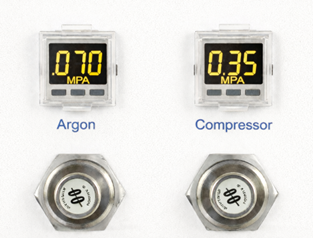
Stay within these ranges. The setpoint values are what the instrument's timing is calibrated against, and the wider range is what's tolerable before delivery consistency starts to suffer.
Why Two Pressure Systems?
The K&A fluidic design separates the force that seals the valves from the force that pushes reagent through them. This is intentional:
- High pressure clamps the membrane valves shut against the manifold. It needs to be high enough to hold a positive seal against the pressurized reagent bottles, but not so high that it deforms the membranes or wears them out prematurely.
- Low pressure sits on top of the reagent bottles and is what actually pushes liquid through the open valves and onto your columns. It needs to be low enough that the instrument can deliver controlled, reproducible volumes within the timed delivery steps the firmware uses.
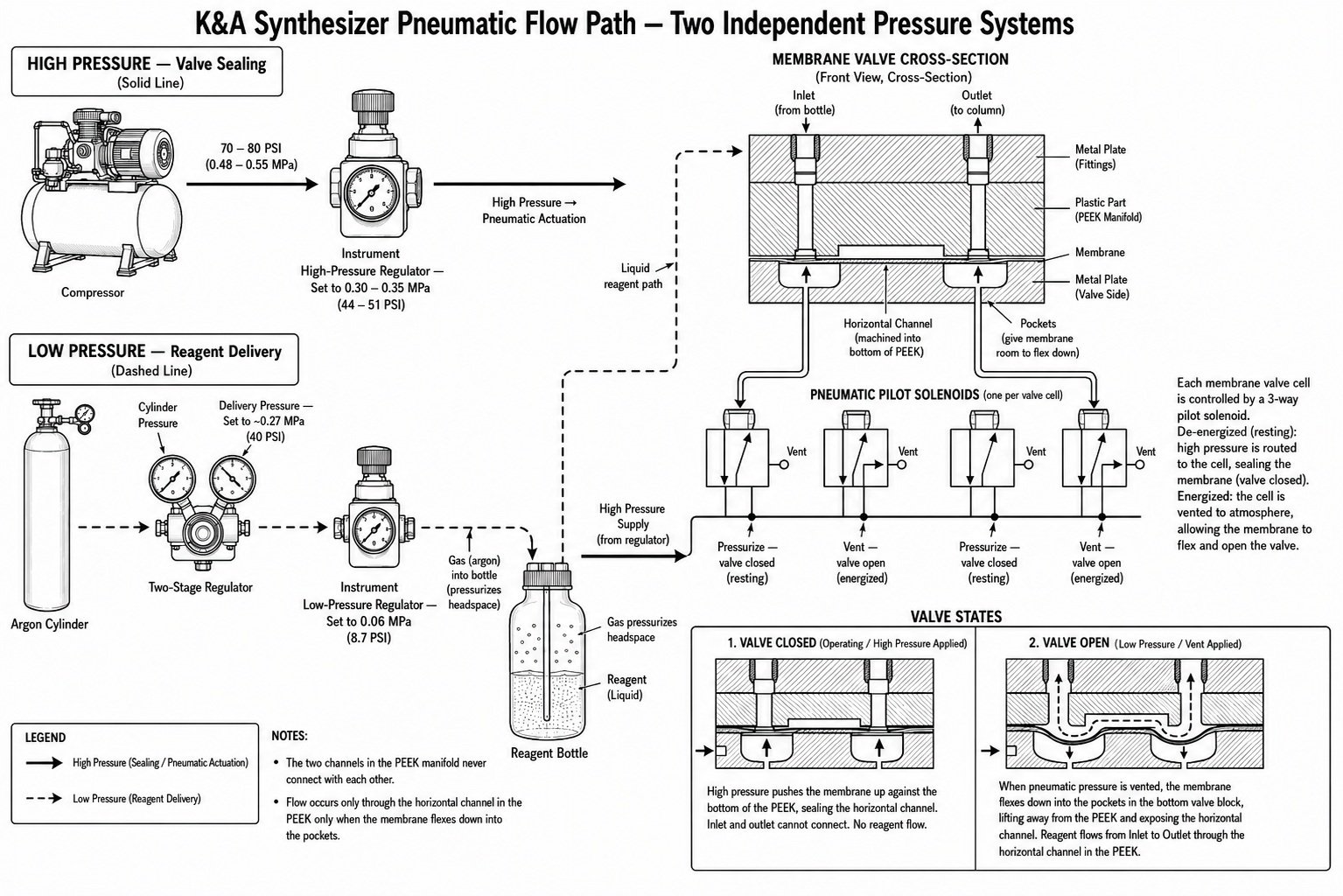
When both pressures are in spec, the valves seal cleanly when closed and reagent flows at a predictable rate when open. When one or both drift, you'll see one of two failure patterns.
Failure Mode 1: High Pressure Too Low (or Low Pressure Too High)
What you'll see:
- Inconsistent yields between columns running the same sequence
- Reagent appearing in columns or waste lines where it shouldn't
- Scattered low-yield positions across a plate or rack
- Visible weeping or dripping at the manifold
- A general sense that the instrument is "leaking" even though nothing is obviously wrong
What's happening:
If high pressure drops below 0.28 MPa (41 PSI), or if low pressure creeps above 0.07 MPa (10.2 PSI), the membrane valves can no longer fully hold back the pressurized reagent. Reagent weeps past closed valves, bleeds into neighboring channels, or delivers partial volumes because the seal wasn't fully established when the valve was commanded open.
This is the most common pressure-related problem we see in the field, and it's frequently mistaken for a bad valve or a bad column when the real issue is system-wide.
Failure Mode 2: High Pressure Too High
What you'll see:
- Under-delivery of reagent across all columns roughly equally
- Slower bottle pressurization at the start of a run
- Longer prime times than usual
- Yield drops that affect every position, not just a few
- Symptoms that look like a reagent concentration or coupling problem
What's happening:
If high pressure climbs above 0.40 MPa (58 PSI), the valves seal harder than necessary and the delivery side becomes the limiting factor. Reagent moves too slowly through the open valve during the firmware's timed delivery window, so each column gets less than the intended volume. Because the deficit affects everything equally, it often looks like a chemistry problem before pressure is checked.
A common cause: if you're feeding the instrument from your building's compressed air supply at 0.5 – 0.7 MPa (73 – 102 PSI) without a proper step-down regulator, the synthesizer's internal regulator may struggle to hold a stable 0.30 – 0.35 MPa, producing pressure spikes that intermittently over-seal the valves.
Failure Mode 3: Supply Pressure Lower Than the Instrument Regulator Setpoint
This one is sneaky because it presents exactly like a leak, and customers will sometimes spend hours chasing a phantom leak before checking it.
What you'll see:
- All the symptoms of Failure Mode 1 (weeping, cross-contamination, scattered low yields, "leaky" behavior) even though there is no actual leak
- The instrument's high-pressure gauge reads at or just below the regulator setpoint and won't climb to where the regulator is set
- Replacing valves, fittings, or membranes does not fix the problem
What's happening:
The high-pressure regulator on the instrument can only regulate down, not up. It needs the incoming supply pressure to be meaningfully higher than the setpoint in order to deliver a stable, regulated output.
If your compressor (or in-house supply) is only putting out 0.35 MPa (51 PSI) and the instrument's high-pressure regulator is set to 0.40 MPa (58 PSI), the regulator has nothing to regulate. The instrument sees whatever the supply happens to be putting out at any given moment, which fluctuates as the compressor cycles. The result is unstable high pressure that drifts below the setpoint, and the membrane valves never get a clean, consistent seal. From the instrument's point of view, this looks identical to a leak.
The rule: your supply pressure must always exceed the instrument regulator setpoint by a comfortable margin. We recommend the compressor or in-house supply deliver at least 0.45 MPa (65 PSI) to the instrument inlet when the instrument regulator is set in the 0.30 – 0.35 MPa range. This gives the regulator enough headroom to hold a stable output even as the compressor cycles or as the building supply fluctuates.
How to check:
- Set the instrument's high-pressure regulator to the target (0.30 – 0.35 MPa).
- Read the supply-side pressure from the gauge on the compressor itself (or, if you're on an in-house supply, the inlet pressure at the instrument).
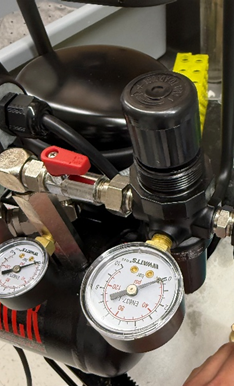
- Confirm the supply pressure is at least 0.10 MPa (15 PSI) above the instrument regulator setpoint.
- If the supply is at or below the setpoint, increase the supply pressure to give the regulator proper headroom. Do not work around this by lowering the instrument regulator below 0.30 MPa.
In-House High Pressure Supply: Special Considerations
Many customers feed the synthesizer from a building compressed air or nitrogen line rather than the integrated compressor. This is supported, but it requires some setup:
- Confirm the regulated delivery pressure at the instrument inlet is 0.30 – 0.35 MPa (44 – 51 PSI), not your house line pressure. Building lines often run 0.5 MPa (73 PSI) or higher.
- Make sure the supply is dry and oil-free. Moisture or oil carryover will contaminate the pneumatic side of the manifold over time, and the resulting damage will look like a pressure imbalance even after pressures are corrected.
- Check for pressure drop during peak use. If the building supply serves multiple instruments or pneumatic tools in the lab, pressure can sag during synthesis steps when the instrument pulls hard. An accumulator or buffer tank fixes this.
Argon (Low Pressure) Supply Considerations
- Argon is preferred over nitrogen for synthesis work. Nitrogen is acceptable and will work mechanically, but argon does a better job of displacing ambient moisture from the bottle headspace, which matters for moisture-sensitive amidite chemistry. If you're running modified bases or RNA chemistry, argon is the better choice.
- Recommended setpoint is 0.06 MPa (8.7 PSI), acceptable range 0.05 – 0.07 MPa (7.3 – 10.2 PSI).
- Set the cylinder regulator at least 30 PSI above the instrument setpoint. The same regulate-down-not-up principle from Failure Mode 3 applies here. With the instrument setpoint at 0.06 MPa (8.7 PSI), set the argon cylinder regulator at roughly 0.27 MPa (around 40 PSI) or higher to give the instrument's internal regulation proper headroom.
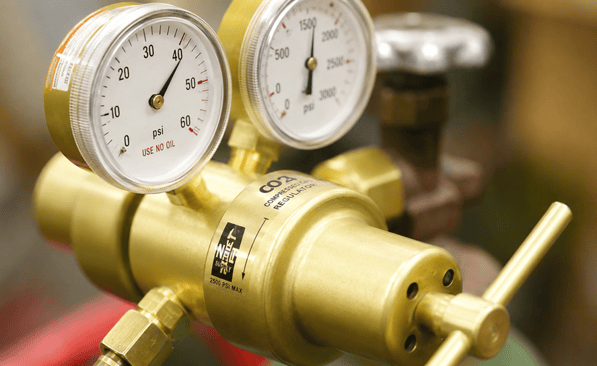
- Check the regulator on the gas cylinder itself, not just the gauge on the synthesizer. A failing two-stage regulator can let the delivered pressure climb as the cylinder empties.
- Look for leaks at the bottle caps and quick-connect fittings. A slow leak on the low-pressure side can drop delivered volume without producing an obvious gauge change, because the regulator continuously replenishes the loss.
What to Check Before Calling Support
When you see inconsistent yields between columns or unexpected delivery problems, work through these checks first:
- Read both pressure gauges at idle. Confirm high pressure is in the 0.28 – 0.40 MPa (41 – 58 PSI) range, ideally 0.30 – 0.35 MPa (44 – 51 PSI). Confirm low pressure is in the 0.05 – 0.07 MPa (7.3 – 10.2 PSI) range, ideally 0.06 MPa (8.7 PSI).
- Read your compressor's output gauge and compare it to the instrument regulator setpoint. The compressor output must be at least 0.10 MPa (15 PSI) above where the instrument's high-pressure regulator is set. If the compressor is at or below the setpoint, the instrument will behave as if it has a leak even though nothing is actually leaking. See Failure Mode 3 above.
- Read your argon cylinder regulator setting. It should be at least 30 PSI above the 0.06 MPa instrument setpoint (around 0.27 MPa / 40 PSI or higher at the cylinder).
- Read both pressures during an active synthesis step, especially during a delivery step on a high-volume reagent like ACN wash or DCA. If either pressure visibly sags during the step, your supply side can't keep up with demand.
- Check the relationship between the two readings. Both should be in their respective ranges. If high pressure is at 0.29 MPa (42 PSI) and low pressure is at 0.07 MPa (10.2 PSI), both are technically in spec but the balance is poor and you'll likely see leak-style symptoms.
- Inspect the in-line filters on both pressure feeds. Replace if discolored or visibly restricted.
- Check that your argon cylinder isn't running low if low pressure has been drifting downward over recent runs.
- Save the log files for the affected run before calling. Delivery problems often show up as slowly increasing prime times before they affect yield, and that pattern is visible in the logs.
Corrective Actions You Can Take
- Adjust the high-pressure regulator to bring readings into the 0.30 – 0.35 MPa (44 – 51 PSI) target. Make changes in small increments and let the system stabilize between adjustments.
- Adjust the argon regulator to deliver 0.06 MPa (8.7 PSI) at the instrument inlet.
- Replace restricted filters on either side.
- For in-house supply setups, have your facilities team check or install a step-down regulator that guarantees a stable 0.30 – 0.35 MPa (44 – 51 PSI) delivery to the synthesizer.
Validating the Fix: Run a Flow Test
After any pressure adjustment, run a flow test on the instrument before committing to a production synthesis run. A flow test confirms that each reagent line is delivering the expected volume in the expected time across all column positions, and it will surface any remaining imbalance immediately rather than after you've burned a real sequence.
If your flow test results are uneven across columns or reagent lines after the pressure adjustment, the pressure correction did not fully resolve the issue and there is likely a downstream component (membrane, filter, fitting) that needs attention. Contact support at that point.
When to Contact Sierra BioSystems Support
Open a ticket with us if:
- Pressure readings won't come into spec with normal regulator adjustment
- Pressures look correct but delivery inconsistency persists
- Your flow test is still uneven after the pressure adjustment
- You've already replaced filters or had membranes serviced recently and the problem is back
- Pressures drift on their own between runs without any obvious cause
To help us diagnose quickly, please include:
- Front-panel gauge readings at idle and during synthesis
- Flow test results from after the pressure adjustment
- Log file from the most recent affected synthesis run
- Whether you're using the internal compressor or an in-house compressed air supply (and the inlet pressure if it's in-house)
- Argon cylinder type and approximate fill level
- Approximate date of the last membrane replacement, if known
Last reviewed: May 2026 Owner: Field Operations, Sierra BioSystems