
This article explains how the trityl monitor works, how to interpret its readings, and why it's a key tool in monitoring oligonucleotide synthesis efficiency.
-png.png?width=670&height=262&name=trityls%20graph%2060mers%207-10%20(002)-png.png)
🔍 What is a Trityl Monitor?
The trityl monitor is a built-in photometer that helps you evaluate coupling quality during synthesis. It measures how much trityl cation (a bright orange byproduct of successful deblocking) is present in each column’s waste stream.
-
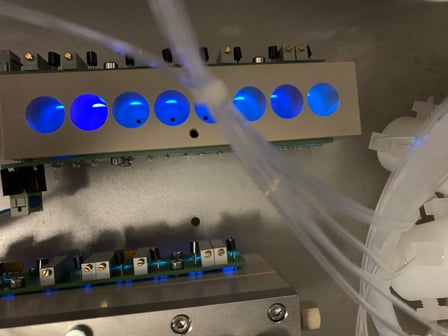
Wavelength: Measurements are taken at 470 nm (blue light), where trityl absorbs strongly.
-
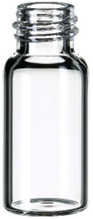
Location: Each column is monitored independently in its own cuvette.
-
Units: Output is not absolute OD—it's a relative extinction value ranging from ~1 (strong trityl signal) to ~4095 (no trityl detected).
How to Interpret the Trityl Monitor (Qualitative, Not Quantitative)
The trityl monitor is a guide, not a verdict. Treat it as a qualitative trend tool that flags where to look, not a quantitative measure of oligo quality or purity. A single low bar does not mean a failed synthesis, and a clean-looking chart does not guarantee a good product. Downstream QC (HPLC and MS) is the only reliable measure of yield and purity.
Many things move the reading independently of true coupling efficiency:
- Bases detritylate at different rates and do not release trityl identically, so some bar-to-bar variation is normal.
- Modified bases (and the base right after them) often show lower trityl and lower coupling by nature. Read modified positions with that in mind.
- Small changes in flow rate, bottle and compressor pressure, membrane condition and column packing shift how much trityl reaches the cuvette, independent of chemistry.
- Cuvette fill affects what you see by eye. Once each vial fills completely, columns look identical even when the underlying signal differs. Compare the readings and the chart, not just the filled vials.
- Purge timing and where deblocks sit in the protocol change what the monitor captures. See Protocol Setup Tips below.
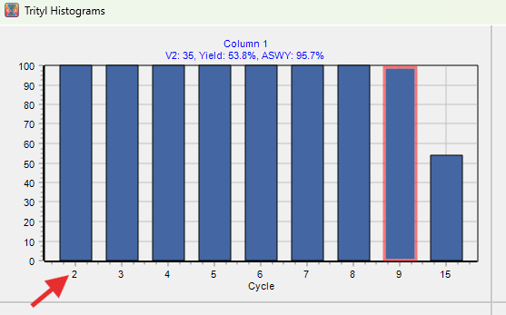
- The whole chart is scaled to the V2 reference (cycle 2). If early coupling is weak, the baseline is skewed and every later bar is measured against a bad reference.
An apparent "recovery" is a measurement artifact, not real improvement. Detritylation cannot increase at a later base than at an earlier one, so bars that appear to climb back up later in the run are telling you about flow rate or timing variation, not about coupling getting better.
Use it this way:
- Watch the shape of the trend, especially a consistent steady decline or a sudden large jump, rather than judging any single bar.
- Keep a standard sequence (a 30 to 40 base straight DNA oligo, no modifiers) on hand to run when troubleshooting. A normal-looking standard tells you the issue is chemistry or protocol, not the instrument.
- Always confirm real quality with QC. A column can read low on trityl and still QC well.
NOTE: The trityl monitor is qualitative, not quantitative. Use it to spot trends and decide where to investigate, then let downstream QC (HPLC and MS) decide whether a synthesis passed.
🔧 Key Concepts
V2 Reference Value
-
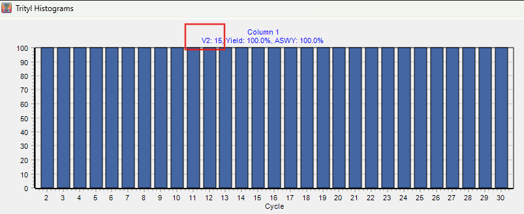
V2 is the extinction value of the second trityl readout (cycle 2).
-
All future values are compared to this to evaluate relative coupling strength. For That reason, on the histogram the V2 Value is always 100%
-
A low V2 value (e.g., 10–50) = strong trityl signal = good early coupling.
-
If the initial coupling is poor and the V2 Value is high, the V2 reference will be skewed, which can lead to misleading-looking charts even if the synthesis is failing.
Tip: Always validate your V2 range by comparing it to downstream QC results. A typical V2 range is 1–100, but this can vary depending on your chemistry and protocols.
Total Yield
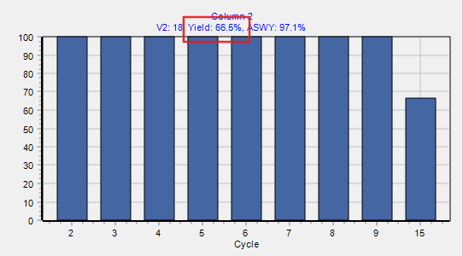
Used to track how much product remains after each synthesis cycle. It’s based on changes in extinction values compared to the baseline:
Formula:

-
A higher extinction reading (closer to 4095) means less trityl retained → lower yield.
-
If extinction values don’t change from cycle to cycle, yield stays at 100%.
- REMEMBER: This is in reference to the V2 value. It is still recommended that you post-process and very yields downstream.
Example:
-
Baseline = 1700, Cycle 20 = 3000 → Yield drops to 45.7%
ASWY – Average Stepwise Yield
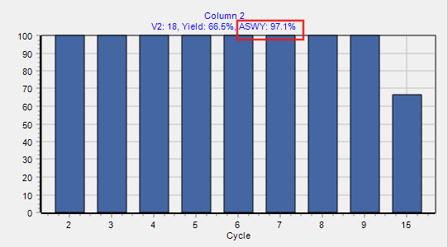
This tells you how efficient each coupling step is.
Formula:
ASWY (%)=(Total Yield)1/Number of Cycles X 100
Example:
45.7% total yield after 20 cycles → ASWY = 97.45% per step
📄 Viewing Trityl Readings in Log Files
In addition to the monitor chart, you can find detailed trityl readings in the instrument log files, which are especially useful for troubleshooting or long-term tracking.
Each trityl reading entry typically includes:
[Timestamp] – $C1 Trityl Values – Baseline: 15, Current: 16 (100.0%)
-
$C1 – $C6: Correspond to individual synthesis columns
-
Baseline: The V2 reference set early in synthesis (cycle 2)
-
Current: The latest extinction value recorded by the monitor
-
Percent: Calculated yield for that column at this cycle
Example from Log:
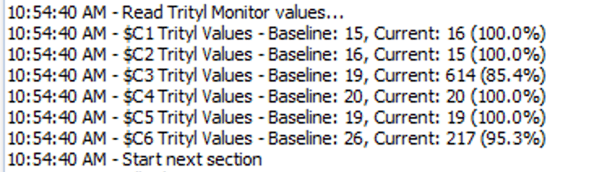
This means column 3 had a good initial coupling (baseline 19), but at the current cycle, the extinction value has increased to 614 — indicating trityl retention has dropped and the cumulative yield is ~85.4%.
Tip: Use these log values to identify coupling failures early, even if the synthesis completes. Large jumps in trityl extinction can point to running out of amidites, clogging, faulty valves, or chemistry issues.
🧪 Protocol Setup Tips
- At the moment, the logs are not saved. If you want to collect that data for future reference you can take screenshots
-
The first deblock of each cycle is sent to the trityl monitor.
-
To avoid measuring trityl from unnecessary steps (like secondary deblocks or washes), put those steps in a later section of your protocol.
-
You can optionally add an extra deblock at the end of each cycle so that the main deblock (which carries the trityl) goes directly to waste instead of the monitor.
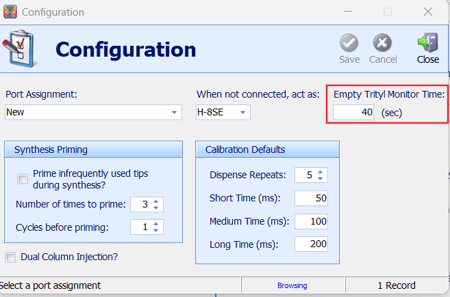
The trityl monitor is automatically purged at the end of every cycle. Purge duration is configured in the software. This value will typically be 20 seconds for most systems and 30-40seconds for VLS Systems.
🖱️ Navigating the Chart
-
Left click & drag down-right to zoom in
-
Left click & drag up-left to zoom out
-
Right click to scroll
-
Each chart is independent—you can zoom and scroll separately for each column.
✅ Summary
| Feature | Description |
|---|---|
| V2 | Reference extinction value (cycle 2) |
| Extinction Range | 1 (strong trityl) to 4095 (no trityl) |
| Total Yield | Drop in extinction = drop in yield |
| ASWY | Stepwise coupling efficiency |
| Purge & Protocols | Careful placement of deblocks improves monitor accuracy |