Applies To: Customers upgrading from legacy K&A software to the new K&A software platform
Last Updated: February 2026
Overview
Before scheduling installation, please review all requirements carefully. Failure to meet these requirements may result in:
-
Software installation failure
-
Instrument communication errors
-
Unstable operation during synthesis
-
Power interruption or unexpected shutdown
1. Instrument Power Supply Requirements
Minimum Required Specification
-
Output: 24 V DC
-
Current Capacity: Minimum 4 Amp
Where to Check
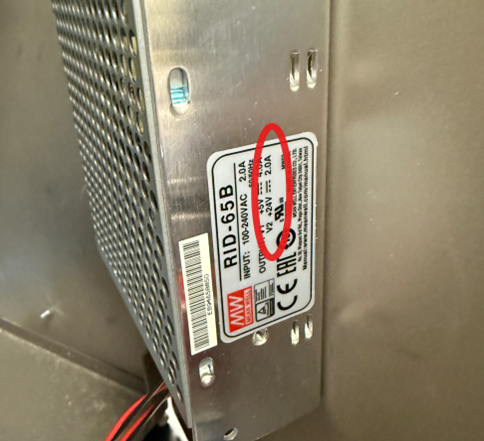
The power supply label is located on the right-side door of the instrument. Check the label to confirm the output voltage and current rating.
Important
Lower-rated power supplies (e.g., 24 V / 2 Amp) like in the image below are not sufficient and may cause:
-
Unstable instrument operation
-
Power loss during synthesis
-
Unexpected shutdowns
-
Potential hardware damage
If your system has a 2 Amp supply, it must be replaced prior to upgrading. Please notify Sierra Biosystems
2. Computer Requirements
The new K&A software must be installed on a Windows-based computer that meets the following specifications.
Operating System
-
Windows 10 (64-bit) (Note: Windows 10 reached Microsoft end of support on October 14, 2025. Plan to upgrade to Windows 11 to maintain ongoing security support.)
-
Windows 11 (64-bit)
32-bit operating systems are not supported.
Memory (RAM)
-
Minimum: 8 GB
-
Recommended: 16 GB for optimal performance
Ethernet Connection (Required)
A physical Ethernet port is required for direct communication with the instrument.
The instrument communication port must be configured with a static IP address:Note: Assign this static IP address to the Ethernet adapter dedicated to the instrument, not the adapter used for LAN or internet access. Assigning it to the wrong adapter will prevent communication with the instrument.
192.168.1.1
If Your Ethernet Port Is Used for Network Access
If your Ethernet port is currently used for LAN/internet access, you will likely need:
-
A USB Wi-Fi adapter, or
-
A USB-to-Ethernet adapter
This allows one connection dedicated to the instrument and one for network access.
Administrative Access
Administrative privileges are required to:
-
Install the K&A software
-
Configure static IP settings
-
Modify firewall or network settings (if needed)
IT coordination is recommended prior to installation, particularly if firewall rules, network configuration, or user privilege policies need to be adjusted.
3. System Configuration Recommendations
To ensure stable operation, we strongly recommend:
-
Windows fully updated prior to installation
-
Automatic sleep mode disabled
-
Hibernation disabled
-
USB selective suspend disabled
-
Antivirus and firewall software configured to allow K&A software communication
Failure to configure power settings properly may result in intermittent communication loss.
4. Legacy Software & Protocol Compatibility
Important: Protocol Import Limitation
Legacy protocols cannot be directly imported into the new K&A software platform.
Customers must:
-
Manually recreate existing synthesis methods
-
Validate recreated protocols before production use
Protocol Optimization May Be Required
Existing synthesis protocols do not transfer over to the new software. Default protocols may require:
-
Optimization
-
Revalidation
-
Adjustment of timing or parameters
Performance characteristics of recreated protocols may differ from those observed with the legacy software. Optimization and revalidation are required before returning to production use.
Backup Recommendation
Before upgrading:
-
Back up all legacy protocols
-
Back up synthesis logs and data
-
Export any required historical records
5. Pre-Upgrade Checklist
Please confirm the following prior to scheduling installation:
-
✅Power supply is 24 V DC / 4 Amp minimum
-
✅Computer runs 64-bit Windows 10 or 11
-
✅Computer has at least 8 GB RAM
-
✅Ethernet port available for direct instrument connection
-
✅Static IP (192.168.1.1) can be configured
-
✅Administrative access available
-
✅Secondary network solution available (if required)
Frequently Asked Questions
Can I import my old protocols into the new software?
No. Legacy protocols must be manually recreated in the new software.
Will my existing methods run identically?
Not necessarily. Protocol optimization and validation will be required after upgrade.
What if my current computer does not meet the requirements?
A new computer can be obtained as long as it meets the requirements above. Consult with Sierra Biosystems if you would like to purchase one directly from them.
Do I need IT support?
In most cases, yes. Administrative access and network configuration are typically required.